





Mountain View, CA — December 2025:
In time for the busy holiday season, Google Chrome is launching four major improvements to Autofill that will help users breeze through shopping checkouts, travel bookings, and repetitive online forms with fewer clicks and a higher degree of accuracy.
Meanwhile, as millions rush to finish up gift orders or set year-end travel, Chrome’s new improvements aim to eliminate that friction of manually entering the same information across websites. It’s about conveniency, speed, and smarter data integration, powered by Google Account and Google Wallet.
- Instant access to Google Account details across the web
Chrome can now better integrate with your Google Account in order to autofill important information, including:
- Name
- Home and Work addresses
That means Chrome instantly populates the right information from the Google Account when users sign up, log in, or place an order online, securely.
This feature is now available on desktop, Android, and iOS.
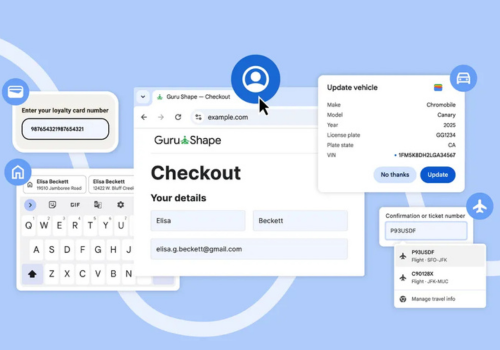
- Autofill for Travel Details & Loyalty Cards via Google Wallet
The major upgrade comes with Chrome’s integration of Google Wallet, which allows the autofill to make use of:
- Loyalty card numbers
- Travel plans
- Vehicle information
High lights:


✔ Get rewarded passively with auto-filled loyalty details at checkout
✔ Auto-populate flight details while booking a rental car.
✔ Autofill vehicle information for insurance quotes or travel forms
For instance, if a user is renting a car and has to fill in the flight arrival information, Chrome will automatically detect the form and pull confirmation number and dates from the booking stored in Wallet because searching in e-mails is eliminated.
These features require Enhanced Autofill to be enabled in Chrome settings.
- An Overhauled Autofill Experience on Chrome for Android
Making mobile form-filling more accurate, Chrome on Android now shows two-line autofill suggestions above the keyboard.
This extended view provides the user with clearer, more detailed suggestions on:
- Passwords
- Addresses
- Means of payment
This will result in fewer errors and faster autofill selection on mobile devices.
- More Accurate Global Address Recognition
Chrome has enhanced its understanding of the nuances of international address formats in order to auto-fill them. Examples include the following:
- Better handling of “between streets” formatting in Mexico
- Future support to phonetic name entries in Japan
These updates bring smoother and more precise autofill experiences to users across the globe.
A Smarter, Faster Chrome for an Even Busier Season
This holiday-driven rollout reduces time consumption and friction while helping users complete their very important tasks, whether that is shopping for presents or planning travels, with much fewer interruptions.
Chrome continues to evolve into an intuitive assistant that contextualizes, predicts, and informs with the right information at the right time.