

Turn YouTube Comments into Enriched Leads with AI
YouTube comments can help you discover people who are interested in a particular topic, product, service, or industry. But manually reviewing comments and researching every commenter can take a significant amount of time.
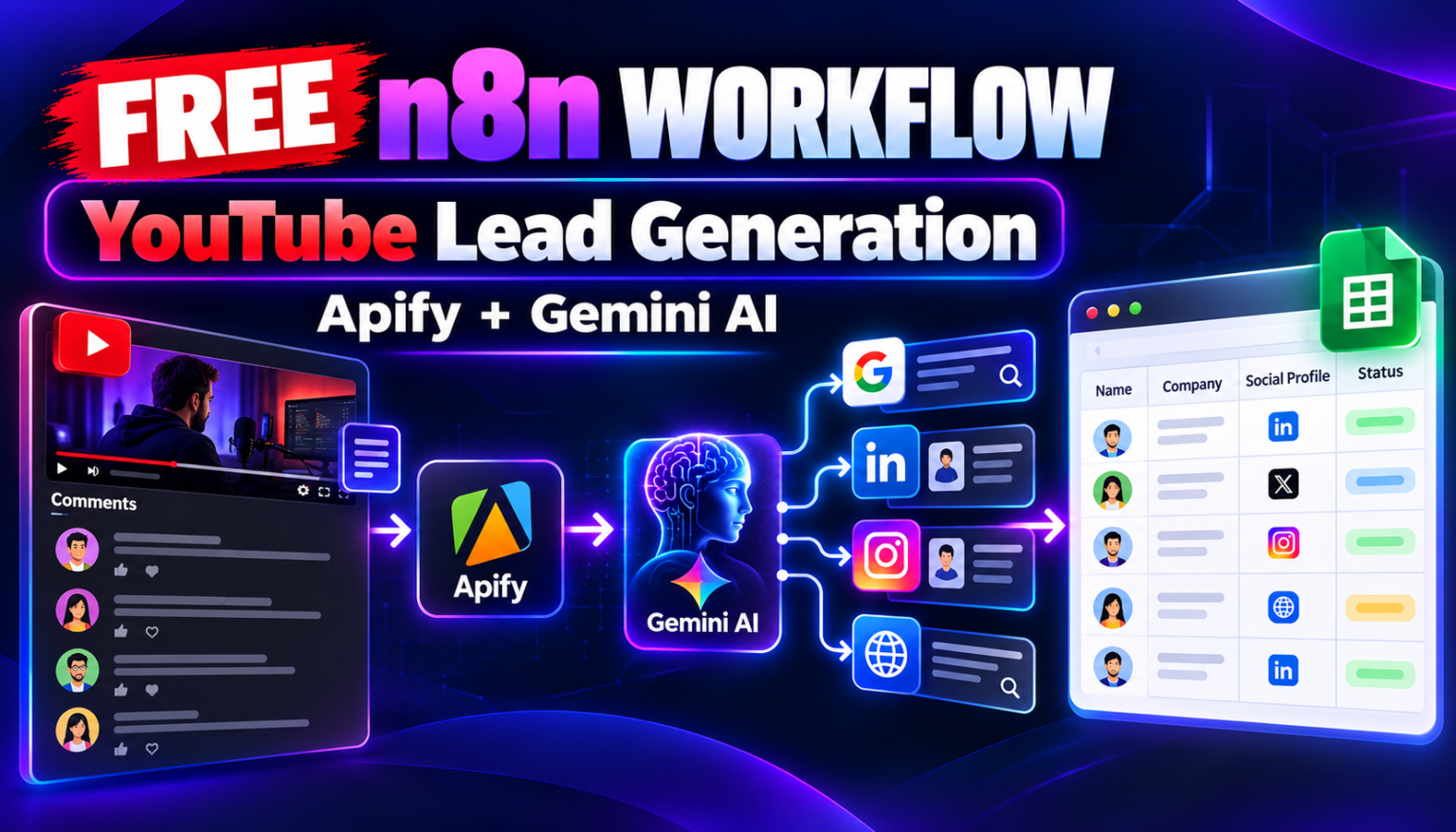
In this tutorial, you’ll learn about a free n8n workflow that collects YouTube video comments, stores them in Google Sheets, and uses an AI agent to research publicly available information about selected commenters.
The workflow combines n8n, Apify, Google Sheets, Gemini AI through OpenRouter, Serper Google Search, and website scraping to create a structured lead research process.
You can download the workflow JSON, import it into your n8n instance, configure your own API credentials, and adapt it to your lead generation process.
📥 Download: ⬇ Download Free n8n Workflow
What Does This Workflow Do?
The automation is divided into two main sections.
1. YouTube comment extraction
The first section retrieves YouTube video URLs from Google Sheets, collects comments through Apify, and saves the results in another spreadsheet.
2. AI-powered lead research and enrichment
The second section uses an AI agent to investigate a commenter’s public online presence, search for relevant social media profiles, inspect websites, and save available findings to Google Sheets.

The goal is to reduce repetitive research and organize potentially relevant prospects in one place.
Tools and APIs Required
| Tool | Purpose |
|---|---|
| n8n | Connects and orchestrates the workflow |
| Google Sheets | Stores video URLs, comments, and lead research results |
| Apify | Retrieves YouTube comments and scrapes website or Instagram profile information |
| OpenRouter | Provides access to the Gemini AI model used by the agent |
| Serper | Searches Google for publicly available information |
Some of these services may have free usage allowances, but API limits and pricing can change. Check the current pricing before running the workflow at scale.
How the Workflow Works
Part 1: Extract YouTube comments
Step 1: Add YouTube video URLs to Google Sheets
The workflow reads video URLs from a Google Sheets document. The videos sheet tracks whether a URL has already been scraped, using a scrapped status field.
Add the YouTube video URLs you want to research and make sure the spreadsheet columns match the workflow configuration.
Step 2: Trigger the workflow
The comment extraction section has two triggers:
- Manual Trigger: Starts the workflow when you execute it yourself.
- Schedule Trigger: Is configured to run hourly.
This allows you to test the workflow manually and configure recurring comment collection.
Step 3: Retrieve video URLs
The Google Sheets node named Get rvideo urls reads the video URL records.
The workflow is intended to process URLs that have not yet been marked as scraped.
Step 4: Extract comments using Apify
The HTTP apify get comments from video node sends a request to an Apify YouTube comments actor.
The video URL is passed to the actor, which returns comment data for the requested video.
Depending on the data returned, this can include information such as:
- Comment author
- Comment text
- Comment ID
- Comment publication time
- Like and reply counts
- Other available comment metadata
The exact fields depend on the scraper output and the video’s available data.
Step 5: Save the extracted comments
The Save scrapped comments Google Sheets node appends comment records to the comments sheet.
This creates a central place where the AI research section can retrieve unprocessed comments.
Step 6: Mark the video URL as scraped
The workflow updates the video’s scrapped field to true.
This is intended to prevent the same video URL from being collected repeatedly.
Before using the workflow in production, verify that the sheet lookup, status update, and comment extraction branches execute in the correct order. The current configuration should be tested to ensure failed scraping attempts are not incorrectly marked as completed.
Part 2: Research and enrich potential leads with AI
Once comment data is available, the second section uses an AI agent to research a commenter’s publicly available online presence.
Step 7: Start the AI research agent
The When chat message received node provides a chat-based entry point.
The workflow also includes a scheduled trigger connected to a Code node, which prepares instructions for the AI agent. This scheduled trigger is configured with a one-minute interval in the uploaded workflow.
Review this interval carefully before activating the workflow. A one-minute schedule can cause frequent executions, consume API credits, and repeat research unnecessarily if processing and status checks are not configured correctly.
Step 8: Prepare the research instructions
The Code node creates the initial instructions for the agent and generates a session identifier.
The instructions tell the agent to research a YouTube comment author, search for publicly available professional information, and save the results.
The agent’s instructions describe researching:
- YouTube channel descriptions
- Public social media profiles
- Personal or company websites
- Publicly listed business contact information
- Professional affiliations and relevant online presence
The workflow should be configured to focus on relevant, public professional information rather than collecting unrelated personal details.
Step 9: Use Gemini AI through OpenRouter
The OpenRouter Chat Model node connects the AI agent to the configured Gemini model.
The AI agent uses this model to decide which research tools to use, formulate search queries, interpret results, and organize the information it finds.
The Simple Memory node provides short-term conversational memory for the agent.
Step 10: Retrieve unprocessed comments
The get comments Google Sheets tool allows the agent to retrieve comment records that have not yet been marked as processed.
This connects the comments collected in Part 1 to the research process in Part 2.
The agent can use the commenter’s available name, handle, or channel information to begin its research.
Step 11: Search Google for relevant profiles
The search google HTTP Request tool uses the Serper API to retrieve Google search results.
The agent can use relevant search queries to look for public profiles and websites associated with the commenter.
Potential findings may include professional LinkedIn profiles, business websites, Instagram accounts, GitHub profiles, and other relevant public pages.
Search results are not proof that a profile belongs to a particular commenter. The information should be verified before it is used for outreach.
Step 12: Extract information from websites
The get url mardown node calls an Apify website content scraper to retrieve website content in Markdown format.
The agent can inspect the returned content to identify relevant information, such as a business description, professional affiliations, or contact information explicitly published on the website.
The scraper is configured with a maximum page limit of 10 for a website crawl request. Actual coverage depends on the website and the scraper’s results.
Step 13: Research Instagram profiles
The instagram full profile scraper tool calls a configured Apify actor to retrieve public Instagram profile information for a username.
The agent may use the results to identify a relevant public profile and understand whether it appears connected to the person or business being researched.
Profile information should be treated as a lead for verification, not as guaranteed identity matching.
Step 14: Create and update lead records
The workflow provides Google Sheets tools for storing research results.
The create a row for new search user node initializes a lead record using a username.
The update result for user node is configured to save fields such as:
- Username
- Email, when publicly available and relevant
- Bio
- Twitter (X)
- TikTok
- GitHub
- Short description
The actual fields saved depend on the Google Sheets column configuration and the data returned by the agent. Missing information should be marked clearly as unavailable rather than guessed.
Step 15: Mark the comment as processed
The mark comment as processed tool updates the corresponding comment record after research.
This is intended to help the agent avoid researching the same comment repeatedly.
Check that the correct comment record is matched and marked only after the research results have been saved successfully.
How to Import the Workflow into n8n
- Download the workflow JSON using the link provided above.
- Open your n8n instance.
- Create a new workflow or open the workflow import option.
- Import the downloaded JSON file.
- Review the nodes, connections, and Google Sheets mappings.
- Configure your own Google Sheets OAuth2 credentials.
- Configure the required OpenRouter, Apify, and Serper API credentials.
- Verify the spreadsheet IDs, sheet names, and column headers.
- Test comment extraction on one video.
- Test lead enrichment on one comment before enabling any recurring execution.
The imported workflow is a starting template. Depending on your n8n version, API configuration, and connected accounts, some nodes may require adjustments.
API Setup Requirements
Apify
You need an Apify account and access to the actors configured in the workflow:
- YouTube video comments scraper
- Website content scraper
- Instagram profile scraper
Add your own Apify credentials or tokens to the relevant nodes.
OpenRouter
The AI agent uses a Gemini model through OpenRouter. Create your own API key and configure the appropriate n8n model credentials.
Serper
The Google Search node requires a Serper API key. Add your own key to the configured HTTP Request tool.
Google Sheets
Connect Google Sheets through n8n OAuth2 credentials. Ensure the connected account has permission to read and update the relevant spreadsheets.
Security note: Never publish API tokens, OAuth credentials, private spreadsheet IDs, or other secrets inside a downloadable workflow. Store credentials securely in n8n and use placeholders in public JSON files.
Important Checks Before Using the Workflow
Before activating this automation, review the following:
- Schedule frequency: The lead research schedule is set to every minute in the uploaded configuration. Adjust it to a sensible interval and ensure completed comments are not repeatedly processed.
- Duplicate prevention: Confirm that the video and comment status fields work correctly.
- Error handling: Make sure failed API requests do not silently mark records as complete.
- Research accuracy: Verify that discovered profiles actually belong to the intended commenter.
- Data quality: Do not invent missing email addresses or social media accounts.
- Privacy and compliance: Collect only relevant information that is publicly available and appropriate for your intended business use. Respect applicable privacy laws, platform terms, and scraping restrictions.
- API usage: Monitor Apify, OpenRouter, and Serper usage and costs.
The workflow is designed to assist with research. It does not guarantee that every commenter will have discoverable social accounts, public contact information, or a verified business identity.
Frequently Asked Questions
Can this workflow automatically extract YouTube comments?
The comment extraction section includes an hourly schedule trigger and a manual trigger. Once correctly configured and activated, it can run on a recurring schedule.
Does the workflow automatically find every commenter’s email address?
No. It searches for publicly available information. Some people will have no discoverable email address or matching social profiles, and search results may be incomplete.
Can I use this workflow for B2B lead generation?
Potentially, yes. It can help identify and research people discussing relevant topics on YouTube. For B2B use, prioritize relevant business context, verify identities, and ensure your outreach follows applicable privacy and marketing rules.
Do I need paid API subscriptions?
Some services may provide free usage allowances, but usage limits and costs vary. Review each provider’s current pricing before running large research jobs.
Does the workflow send outreach messages automatically?
No. The uploaded configuration focuses on collecting comments, researching profiles, and storing information in Google Sheets. It does not include an email or social media outreach-sending step.
Can I customize the workflow?
Yes. You can modify the search instructions, spreadsheet columns, processing schedule, research tools, and lead qualification criteria to suit your needs.
Final Thoughts
This n8n workflow combines YouTube comment extraction with AI-assisted prospect research. It can help reduce manual work by collecting comments, searching for relevant public information, and organizing findings in Google Sheets.
If you want to explore the workflow, download the JSON, configure your own credentials, and start with a small test before scaling up.
Download: ⬇ Download Free n8n Workflow
Get More Free AI Automation Workflows
Want more practical n8n workflows, AI automation tutorials, and ready-to-use templates?
LearnAI Tools
Join our channels to receive updates when new workflows and tutorials are published.
- Telegram: Join for new workflow releases, tutorials, and automation tips.
- WhatsApp Channel: Follow for quick updates and links to new workflow downloads.
Follow All Market Updates for more automation tutorials, AI tools, and practical workflow ideas.
Disclaimer: This tutorial describes a workflow template, not a guarantee of results. Use the automation responsibly, verify all collected information, and comply with applicable laws, privacy requirements, and platform terms.